Configuration
End-to-end setup and every setting explained, for Expert Services, partners and CRM administrators. Budget about an hour, plus whatever customer IT needs for deployment.
The defaults are chosen to work out of the box on a standard solution: history as the limetype, notes for the body, the person relation for the sender, and a category value for sent and received emails. On a tailored solution, expect to adjust them.
The two steps people skip
Step 4 (Selective File Storage, if the customer uses Live Docs) and step 6 (a card variant for emails). The first causes complaints about speed; the second is the difference between a form users like and a form they tolerate. Neither takes long.
Checklist
- 1. Check the requirements — customer and/or Lime consultant
- 2. Install the package — Lime consultant
- 3. Add the JWT signing key — Lime consultant
- 4. Live Docs? Turn on Selective File Storage — Lime consultant
- 5. Configure the add-in in Lime Admin — customer's Lime CRM admin or Lime consultant
- 6. Create a card variant for emails — customer's Lime CRM admin or Lime consultant
- 7. Hand the manifest to customer IT — customer's Lime CRM admin or Lime consultant
- 8. Connect and test — customer's Lime CRM admin
Check the requirements
Who: customer and/or Lime consultant.
Run through Requirements. In particular confirm the solution is on Lime CRM 3.80.0 or newer, reachable over HTTPS, and that the users are on New Outlook or Outlook on the web.
Install the package
Who: Lime consultant.
This step is usually unnecessary: the package is already added as a dependency for all Lime Cloud customers by default. Action is only needed if that isn't the case for this solution.
Add the package to the solution and deploy it as you would any other Lime add-on:
poetry add limepkg-mail-addin
In the application configuration
JWT signing key
Who: Lime consultant.
Required. Without it, users cannot connect.
Add it to the application configuration, replacing <your-app> with the application name:
"<your-app>": {
    "secrets": {
        "limepkg_mail_addin": {
            "jwt_signing_key": "<a long random string>"
        }
    }
}
<your-app>:
    secrets:
        limepkg_mail_addin:
            jwt_signing_key: <a long random string>
Any long random string works — it is never typed by a user. Use a different value per application and environment. Changing it disconnects every user, who must then reconnect.
Press the button to fill in a key, generated in your browser and never sent anywhere:
See Technical.
Redis for OAuth (on-premise)
On Lime Cloud this is provided by the platform and needs no configuration.
For on-premise installations, set a Redis URL in the server configuration:
plugins:
  limepkg_mail_addin:
    oauth:
      redis_url: redis://localhost:6379/1
The URL supports authentication: redis://user:password@host:port/db.
If the customer uses Live Docs, turn on Selective File Storage
Who: Lime consultant.
Check whether the solution uses Live Docs — if so, Selective File Storage must be configured before the first email is saved, or saving becomes painfully slow.
Configure Selective File Storage so Office documents go to Live Docs and everything else goes to the database or S3, and copy the extensions block from that documentation into the configuration, adjusted to the customer's needs.
In Lime Admin
Who: customer's Lime CRM admin or Lime consultant.
Settings live under Lime Admin → Mail Addin, in five numbered sections plus a toggle — the sections below map directly to them.
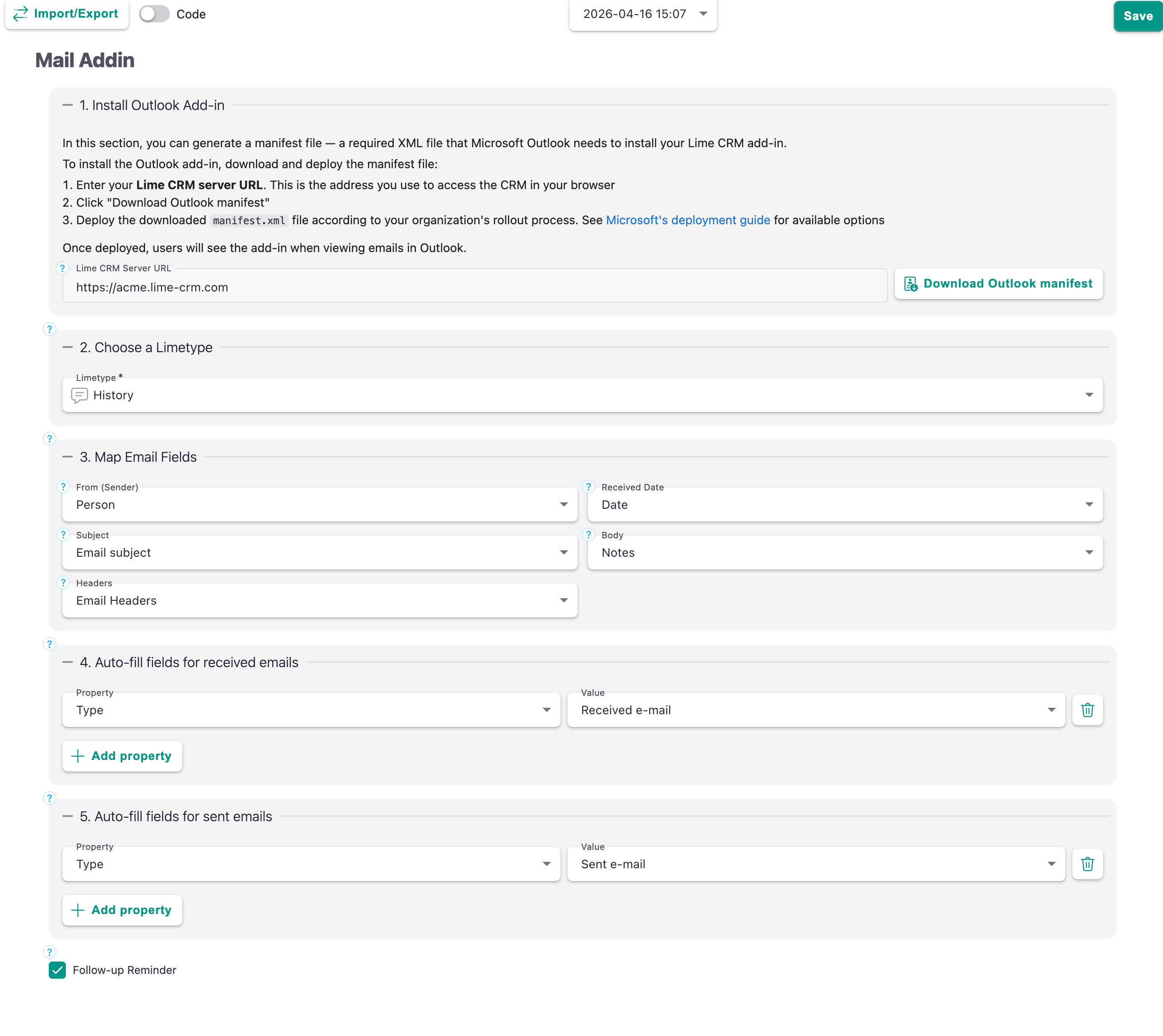
1. Install Outlook Add-in
Generates manifest.xml, the file Outlook needs in order to load the add-in.
| Field | What it does |
|---|---|
| Lime CRM Server URL | The URL used to access Lime CRM in the browser, for example https://acme.lime-crm.com. Baked into the manifest, so Outlook knows where to load the add-in from. |
| Download Outlook manifest | Downloads manifest.xml, built from the URL above. |
Use the customer's production URL over HTTPS. A trailing slash is stripped automatically.
The downloaded manifest still needs to be deployed to users — see Deploying to Outlook. Changing the URL later means it has to be redeployed.
2. Choose a Limetype
Which limetype a saved email becomes.
history is the default and the usual answer, but any limetype works.
Pick a limetype with a hasmany relation to Document
Attachments are only linked to the email record as Document records when the chosen limetype has a relation to Document — a hasmany relation links every selected attachment. Without one, the attachment files are still uploaded and saved to the customer's Lime CRM file storage, they just end up as unlinked files rather than Document records, which is untidy. See Technical.
3. Map Email Fields
For each email property, pick the field on the chosen limetype that should hold it. Leave a mapping empty to skip that property entirely — a useful lever for data minimisation.
Only fields of a compatible type appear in each dropdown.
| Email property | Field types offered | Notes |
|---|---|---|
| From (Sender) | Relation fields (belongsto, hasone) |
Point this at the Person limetype. On import, the add-in looks up a Person by email address and links it automatically. |
| Received Date | date / time fields |
Stores the email's original timestamp, not the import time. |
| Subject | string fields |
|
| Body | text fields |
See the warning below. |
| Headers | text or string fields |
Raw email headers. Only worth mapping for troubleshooting or compliance — see GDPR. |
The body field needs the right web component
The field mapped to Body must use limebb-text-editor as its web component, set in Lime Admin → Views → Card view. Otherwise the HTML body will not render correctly and users will see markup instead of a formatted email.
4 and 5. Auto-filled Fields
Default values applied to the new record when an email is saved — configured separately for received emails (section 4) and sent emails (section 5).
On a standard solution these come pre-filled with the receivedemail and sentemail category values.
Mapped email data wins
If an auto-filled property targets the same field as a mapping in section 3, the actual email data takes priority over the auto-filled value.
Properties are validated against the chosen limetype when you save the configuration — if you change limetype, check these sections again.
Follow-up Reminder
A toggle. When on, users get a tick-box while saving an email that creates a reminder in Lime CRM, linked to the saved record.
Turn it off if the customer handles follow-ups another way and the extra control just adds noise.
Check that nothing is showing an error before saving.
Create a card variant for emails
Who: customer's Lime CRM admin or Lime consultant.
Strongly recommended, and quick. Saved emails look and feel much better on a card designed for them than on the generic one.
Why it matters
The form users see when saving an email is the Lime CRM web client. That means the whole web client toolbox applies — and it means that if you leave the generic card in place, users get a generic experience.
Spending ten minutes here is the highest-value thing you can do after the basic setup.
Out of the box, saving an email opens the standard create dialog for the chosen limetype. On a typical history card that means the user first meets a Type dropdown and a Date field, and has to scroll to reach the notes — where the email they actually care about is sitting.
A card designed for emails puts the body at the top, keeps the relations that make sense for an email, and drops the ones that don't.
Create a variant for emails
- Make sure the add-in's auto-fill settings set something you can condition on — the
sentemailandreceivedemailcategory values are there by default. - In Lime Admin, create a variant on the chosen limetype, conditioned on that value.
- Design the card for that variant.
If sent and received emails deserve different treatment, make two variants. If not, one condition covering both is fine.
What to put on the card
Lead with the content. The body field first, or close to it. It is the reason the user clicked save.
Keep the relations that matter for an email. Company, person, ticket, deal — whatever this customer actually files correspondence against.
Remove the relations that don't. If nobody will ever link an email to a marketing activity, take it off the card. Every field you remove is one fewer decision at save time.
Mind the field order. Users read top to bottom and stop when they think they're done. Anything below the fold may as well not exist.
Set sensible defaults. Anything that is always the same value should be auto-filled in auto-fill settings rather than chosen by the user.
Check required fields. A required field that the add-in doesn't fill blocks every save. Either map it, auto-fill it, or make it optional.
Everything else the web client does, works
Because it is the web client, these all work in the save form with no extra effort:
- Inline create — create a missing company or person without leaving the form.
- Search and filtering on relation fields.
- Option queries — filter dropdowns based on other fields.
- Validation and required fields.
- Access rules — a user cannot create something they wouldn't be allowed to create in CRM.
- Translations — the form follows the user's language.
If you want to change how the add-in behaves, the question to ask is almost always "how would I change this in the web client?" The answer is the same.
Attachments
The attachment picker is part of the add-in, not the card, so there is nothing to design there. Two things worth knowing when advising a customer:
- A full
.emlcopy of the email is offered alongside the real attachments. Some customers love it as a complete record; others find it clutter. Users can untick it per email. - If the limetype has a
belongstorelation to Document, users get an extra picker for which single document fills that field. Consider whether that relation belongs on an email card at all.
Hand the manifest to customer IT
Who: customer's Lime CRM admin or Lime consultant.
Download manifest.xml from the Install Outlook Add-in section in Lime Admin and send it to the customer's IT contact, along with a link to Deploying to Outlook.
For a quick test you can sideload it yourself — see option 3.
Note
Centrally deployed add-ins can take up to 24 hours to reach users' Outlook. Plan the demo accordingly.
Connect and test
Who: customer's Lime CRM admin.
Once the add-in appears in Outlook:
- Open an email and click Lime CRM → Save in CRM.
- In the task pane, click Connect and follow the prompt to approve the connection with your Lime CRM login. This is once per user, per device.
- Click Save in CRM. The save form opens.
- Save the record.
Then verify:
- The body arrived with its formatting intact.
- Inline images are shown in the body, not as placeholders.
- Attachments are listed and saved as Documents linked to the record.
- The sender was linked to the right Person.
- The received date is the email's date, not today's.
- Reopening the email in Outlook shows "Already saved" with a working link.
- Saving a sent email picks up the sent-email auto-fill defaults.
- Saving is fast — if it drags, revisit Selective File Storage.